Refinely automatically initiates a discovery session to surface requirements, roles, and edge cases. It transforms incomplete blurbs into a set of production-ready features and stories in GIVEN/WHEN/THEN format that your team can develop and test from immediately.
Works on any Epic, Feature, or Story — right inside your Jira UI.

Two powerful workflows
Starting from a blank slate or picking up an existing ticket — Refinely meets you where the work is happening, right inside Jira.
Have a product idea but no tickets yet? Describe what you're building in plain English. Refinely will clarify the unknowns and build your entire backlog — from Epics down to Stories — in a single session.
Type your vision in plain English. No templates, no structure needed.
Refinely asks about roles, rules, and edge cases you haven't thought of yet.
Full features and acceptance criteria appear on the canvas, ready to review.
One click creates everything in Jira — linked, formatted, and ready for the team.
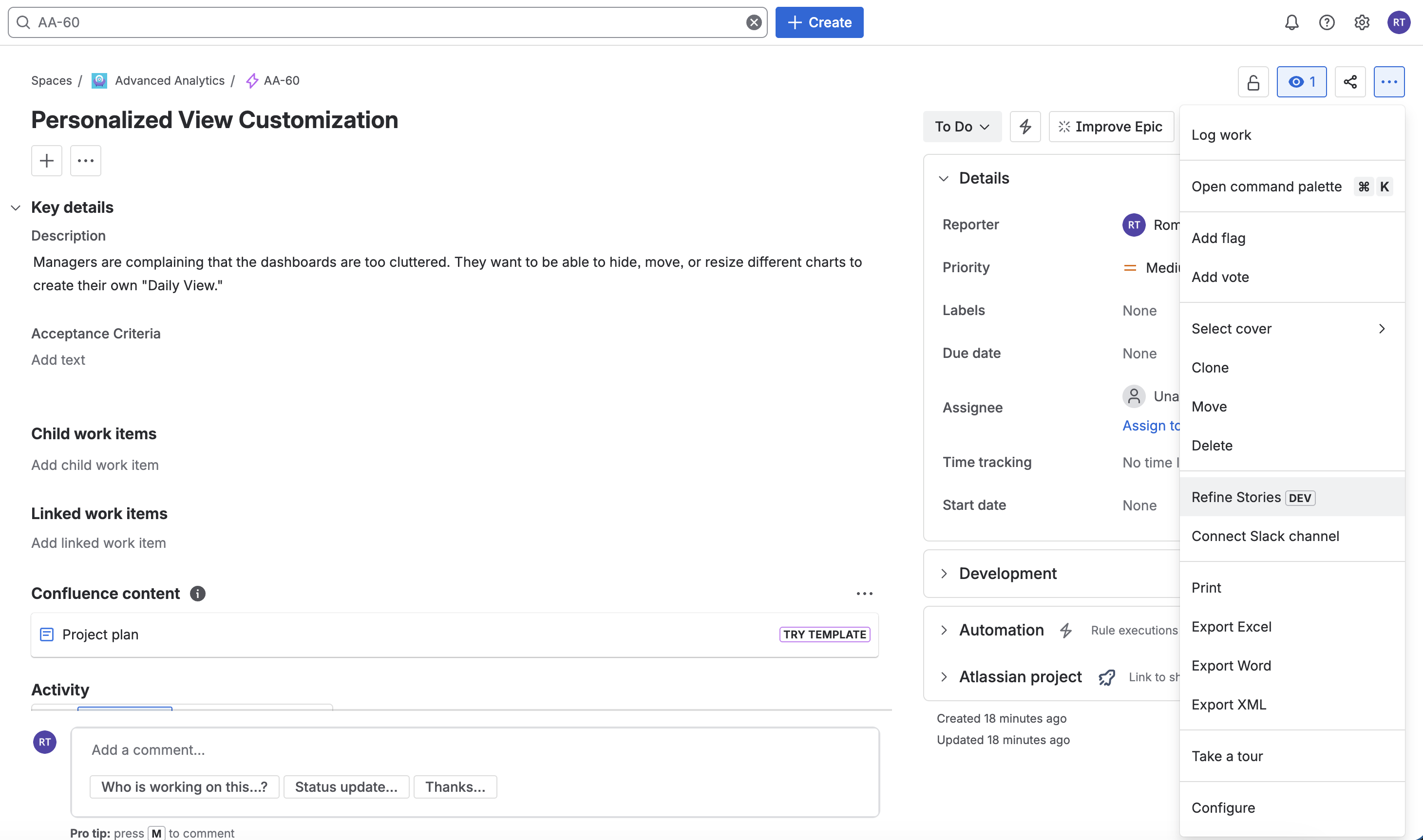
Already have a ticket that's too thin for developers? Open Refinely from that ticket. It reads your existing context, asks targeted questions, and returns a fully structured set of Stories — without leaving Jira.
Click the Refinely button on any Jira issue — Epic, Story, or Task.
Similar stories, work instructions, and project rules are loaded automatically.
Targeted discovery questions fill the gaps — no long briefing documents.
Check the redline view, approve every change, then push to Jira.
What makes it different
Every feature is grounded in your existing backlog, your work instructions, and your team's writing style — not generic prompts.
Instead of guessing, Refinely initiates a discovery session to surface requirements, roles, and edge cases — the exact gaps that cause rework when the dev team finds them first.
A two-line spike gets a quick clarification and a handful of stories. A large Epic triggers a multi-stage discovery session. Refinely reads the complexity and adjusts automatically.
Refinely reads your existing Jira stories before it writes a single word, so the structure, terminology, and tone stay aligned with how your team already writes.
Upload your SOPs, process guides, or standards documents as PDF, Excel, CSV, markdown, or plain text. When a ticket relates to that process, Refinely pulls the right sections before generating.
Every story comes with structured GIVEN / WHEN / THEN criteria — validated against common gaps before you ever see the output. Developers get what they actually need to build.
Work on a full-screen canvas. Edit any story individually, or ask the AI to update ten at once: "simplify the language" or "add a timeout scenario to every payment story."
Before anything goes to Jira, Refinely shows a word-by-word diff between your original and the AI's output. Nothing sneaks past you — every addition and removal is highlighted.
Configure your business domain, actor roles, and process taxonomy once. Every output respects your organisation's vocabulary — not generic tech jargon.
One click creates Stories, Epics, or Features in Jira — with full rich text, story links back to the source ticket, and your team's custom field values pre-filled.
Use your own Google Gemini, OpenAI, or Anthropic key. You pay your provider directly — only for what you use. Refinely stores your keys in Atlassian's encrypted secret storage.
All sessions are saved automatically. Come back an hour later or a day later — your canvas is exactly where you left it, ready to continue.
We believe teams should stay in control of the AI providers used for backlog refinement. Refinely keeps the orchestration inside Atlassian Forge and lets admins configure the provider that best fits their workspace.
Refinely uses your workspace's own AI provider credentials so your team controls provider choice, usage policy, and billing directly.
Keys are stored using Atlassian's encrypted Forge storage and used only for user-initiated generation and refinement flows.
Refinely does not run its own external model backend. Relevant Jira-derived prompt content is sent only to the configured provider needed to fulfill the request.
The current launch posture supports Google Gemini, OpenAI, and Anthropic so teams can balance speed, cost, and reasoning depth.
Provider Choice: Your workspace decides which supported provider is active and which policy terms apply to that provider relationship.
Direct Linkage: All AI requests are proxied directly through your Jira instance's secure outbound request engine.
No Middleman: We don't run a separate external model backend. Refinely sends requests to your configured provider through the Forge-hosted app runtime.
How it works
Seven steps. No process training required. Works on any Jira issue type — whether you're starting from scratch or refining something that already exists.
Launch directly from any issue

Pro Tip: You can also open Refinely from the Apps toolbar to start from scratch, without a source ticket.
Security Overview
Refinely is a fully server-side Atlassian Forge app. It uses an encrypted BYOK architecture so Jira-derived prompt content is only processed when your workspace asks the app to generate or refine backlog content.
All code executes on Atlassian's server-side Forge runtime. No external backend, no self-hosted infrastructure. Your data stays within Atlassian's security perimeter.
All persistent data is stored using Atlassian's Forge Storage with 256-bit encryption. Keys are never logged or exposed in plain text.
Persistent app state is stored in Atlassian Forge storage. External provider calls only occur when the app is asked to generate or refine content.
Session history, work instruction indexes, and backlog context are stored in encrypted Atlassian Forge storage per installation. Smartif.ai does not operate a separate app database for this product.
Data travels from the Forge runtime to the configured AI provider (Google Gemini, OpenAI, or Anthropic) over encrypted TLS when a user initiates a generation or refinement request.
Selected expanded-package workspaces can enable masking controls that redact supported PII patterns before outbound provider calls. These controls are not part of the Standard Marketplace tier.
Store provider credentials for Google Gemini, OpenAI, or Anthropic in Forge storage. Keys are redacted in the UI and handled only in the server-side resolver layer.
Published on the Atlassian Marketplace with security review. Operates within the trusted security boundaries of the Atlassian Cloud platform.
Detailed information can be found in our Data Privacy Policy and Terms of Service.